
Checkliste für die Bereitstellungsvoraussetzungen
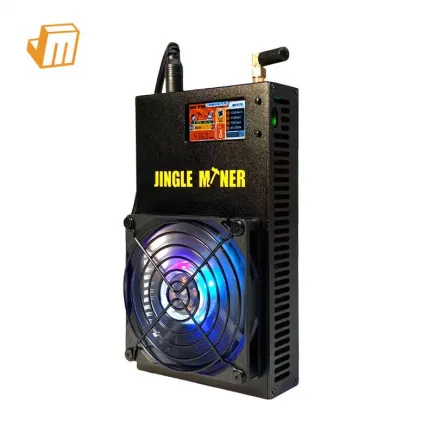
Die erfolgreiche Bereitstellung Ihres Jingle Miner BTC Solo Pro 4.8T erfordert sorgfältige Vorbereitung, um optimale Leistung und Langlebigkeit zu gewährleisten. Dieser kompakte, aber leistungsstarke SHA-256-Miner mit einer Hashrate von 4,8 Th/s und einem extrem niedrigen Stromverbrauch von 96W ist für effizienten Betrieb ausgelegt, doch eine stabile Umgebung und korrekte Erstkonfiguration sind von größter Bedeutung. Bevor Sie das Gerät überhaupt einschalten, erleichtert das Sammeln der notwendigen Komponenten und das Verständnis der Grundvoraussetzungen den Prozess und verhindert häufige Fehler, wodurch die Grundlage für einen zuverlässigen Mining-Betrieb gelegt wird, sei es für Solo-Exploration oder die Integration in eine größere Farm.
Um eine reibungslose und effiziente Bereitstellung Ihres Jingle Miner BTC Solo Pro 4.8T zu gewährleisten, bereiten Sie die folgenden wesentlichen Gegenstände vor:
· Stabile Stromversorgung: Aufgrund seines Stromverbrauchs von 96W benötigt der Jingle Miner BTC Solo Pro 4.8T eine zuverlässige Stromquelle. Obwohl seine Wattzahl niedrig ist, können Schwankungen die Stabilität beeinträchtigen. Stellen Sie sicher, dass Sie eine Standard-Steckdose (kompatibel mit dem mitgelieferten Netzkabel, z.B. EU-Kabel, falls angegeben) haben, die eine konstante Spannung liefern kann. Erwägen Sie einen Überspannungsschutz, um Ihr Investment vor unvorhergesehenen Stromereignissen zu schützen.
· Ethernet-Netzwerkkabel: Eine stabile kabelgebundene Internetverbindung ist für unterbrechungsfreie Mining-Operationen entscheidend. Der Miner muss ohne Latenz oder Paketverlust mit dem Mining-Pool kommunizieren. Verwenden Sie ein hochwertiges Ethernet-Kabel (RJ45), um den Miner direkt mit Ihrem Router oder Netzwerk-Switch zu verbinden, und vermeiden Sie nach Möglichkeit WLAN für das primäre Mining aufgrund potenzieller Instabilität und höherer Latenz.
· Computer oder mobiles Gerät mit Webbrowser: Sie benötigen ein Gerät, um auf die webbasierte Oberfläche des Miners für die Erstkonfiguration zuzugreifen. Dies kann ein Desktop-Computer, Laptop oder sogar ein Smartphone sein, vorausgesetzt, es ist mit demselben lokalen Netzwerk wie der Miner verbunden. Ein moderner Webbrowser (Chrome, Firefox, Edge) wird für die Kompatibilität empfohlen.
· IP-Scanner-Tool: Tools wie Advanced IP Scanner, Angry IP Scanner oder sogar in einigen Routern integrierte Netzwerk-Scan-Funktionen sind unverzichtbar, um die dem Miner zugewiesene IP-Adresse in Ihrem lokalen Netzwerk zu finden. Dieser Schritt ist entscheidend für den Zugriff auf die Konfigurationsseite des Miners und oft der erste Anlaufpunkt für die Fehlerbehebung, wenn erste Verbindungsversuche scheitern.
Konfiguration & Vernetzung
Die korrekte Konfiguration Ihres Jingle Miner BTC Solo Pro 4.8T ist entscheidend, damit er beginnt, Hashrate zum Bitcoin-Netzwerk beizusteuern. Sobald der physische Aufbau abgeschlossen und alle Voraussetzungen erfüllt sind, umfassen die nächsten kritischen Schritte das Auffinden des Miners in Ihrem Netzwerk und das Programmieren seiner Mining-Pool-Einstellungen. Dieser Prozess beinhaltet typischerweise den Zugriff auf die integrierte Web-Oberfläche des Miners, die eine benutzerfreundliche Schnittstelle zur Verwaltung seiner Betriebsparameter bietet. Das Verständnis, wie man Pool-Details korrekt eingibt und Netzwerkstabilität sicherstellt, wirkt sich direkt auf Ihre Mining-Effizienz und Rentabilität aus, was diese Phase für jeden ernsthaften Miner unverzichtbar macht.
1. Ermitteln der IP-Adresse Ihres Miners und Erstzugriff: Nachdem Sie Ihren Jingle Miner BTC Solo Pro 4.8T mit Strom und Ihrem lokalen Netzwerk über Ethernet verbunden haben, ist der erste Schritt, seine IP-Adresse zu ermitteln. Dies geschieht typischerweise mit einem IP-Scanning-Tool, das auf einem Computer installiert ist, der mit demselben Netzwerk verbunden ist. Führen Sie den Scanner aus, und er listet alle aktiven Geräte auf, einschließlich Ihres Miners. Suchen Sie nach einem Gerät mit einer MAC-Adresse, die zu Ihrem Miner passt, oder einer unbekannten IP-Adresse. Sobald identifiziert, öffnen Sie Ihren Webbrowser und geben die IP-Adresse des Miners in die URL-Leiste ein. Dies sollte Sie zur Login-Seite des Miners führen, wo Sie die Standard-Anmeldedaten eingeben (normalerweise "root" für Benutzername und Passwort, obwohl dies je nach Firmware-Version variieren kann und mit dem Handbuch des Miners überprüft werden sollte).
2. Konfigurieren der Mining-Pool-Einstellungen: Nach erfolgreichem Login in die Web-Oberfläche des Miners navigieren Sie zum Abschnitt "Miner Configuration" oder "Pool Settings". Hier geben Sie die Details für Ihren gewählten SHA-256-Mining-Pool ein. Sie müssen typischerweise drei Informationen für mindestens einen Pool angeben, und idealerweise zwei oder drei für Redundanz:
· Pool-URL/Adresse: Dies ist die Serveradresse Ihres Mining-Pools (z.B. stratum+tcp://btc.examplepool.com:3333). Stellen Sie sicher, dass Sie die korrekte Portnummer verwenden, die von Ihrem Pool angegeben wird.
· Worker-Name: Dies ist normalerweise Ihr Mining-Pool-Benutzername gefolgt von einer Worker-Kennung (z.B. yourusername.worker1). Dies hilft Ihnen, die Leistung einzelner Miner in Ihrem Pool-Dashboard zu verfolgen.
Deployment Prerequisite Checklist Successfully deploying your Jingle Miner BTC Solo Pro 4.8T requires meticulous preparation to ensure optimal performance and longevity. This compact yet potent SHA-256 miner, with its 4.8Th/s hashrate and ultra-low 96W power draw, is designed for efficient operation, but a stable environment and correct initial setup are paramount. Before you even power on the device, gathering the necessary components and understanding the basic requirements will streamline the process and prevent common pitfalls, setting the foundation for a reliable mining operation, whether for solo exploration or integration into a larger farm. To ensure a smooth and efficient deployment of your Jingle Miner BTC Solo Pro 4.8T, prepare the following essential items: · Stable Power Supply: Given its 96W power consumption, the Jingle Miner BTC Solo Pro 4.8T requires a reliable power source. While its wattage is low, fluctuations can still impact stability. Ensure you have a standard power outlet (compatible with the provided power cable, e.g., EU cable if specified) that can deliver consistent voltage. Consider a surge protector to safeguard against electrical spikes, protecting your investment from unforeseen power events. · Ethernet Network Cable: A stable wired internet connection is critical for uninterrupted mining operations. The miner needs to communicate with the mining pool without latency or packet loss. Use a high-quality Ethernet (RJ45) cable to connect the miner directly to your router or network switch, avoiding Wi-Fi for primary mining where possible due to potential instability and higher latency. · Computer or Mobile Device with Web Browser: You'll need a device to access the miner's web-based interface for initial configuration. This can be a desktop computer, laptop, or even a smartphone, provided it is connected to the same local network as the miner. A modern web browser (Chrome, Firefox, Edge) is recommended for compatibility. · IP Scanner Tool: Tools like Advanced IP Scanner, Angry IP Scanner, or even network scanning features built into some routers will be indispensable for locating the miner's assigned IP address on your local network. This step is crucial for accessing the miner's configuration page and is often the first point of troubleshooting if initial connection attempts fail. Proper configuration of your Jingle Miner BTC Solo Pro 4.8T is essential for it to begin contributing hashrate to the Bitcoin network. Once the physical setup is complete and all prerequisites are met, the next critical steps involve locating the miner on your network and programming its mining pool settings. This process typically involves accessing the miner's built-in web interface, which provides a user-friendly gateway to manage its operational parameters. Understanding how to correctly input pool details and ensure network stability will directly impact your mining efficiency and profitability, making this phase non-negotiable for any serious miner. 1. Locating Your Miner's IP Address and Initial Access: After connecting your Jingle Miner BTC Solo Pro 4.8T to power and your local network via Ethernet, the first step is to discover its IP address. This is typically done using an IP scanning tool installed on a computer connected to the same network. Run the scanner, and it will list all active devices, including your miner. Look for a device with a MAC address matching your miner or an unfamiliar IP address. Once identified, open your web browser and enter the miner's IP address into the URL bar. This should bring you to the miner's login page, where you will enter the default credentials (usually \"root\" for both username and password, though this can vary by firmware version and should be verified with the miner's manual). 2. Configuring Mining Pool Settings: Upon successfully logging into the miner's web interface, navigate to the \"Miner Configuration\" or \"Pool Settings\" section. Here, you will input the details for your chosen SHA-256 mining pool. You will typically need to provide three pieces of information for at least one pool, and ideally two or three for redundancy: · Pool URL/Address: This is the server address of your mining pool (e.g., · Worker Name: This is usually your mining pool username followed by a worker identifier (e.g., · Password: For most pools, the password can be anything, often just \"x\", but some pools may require a specific password. After entering these details, save the configuration. The miner should then reboot or restart its mining process, and within a few minutes, you should see its hashrate reporting to your mining pool dashboard. 3. Network Optimization and Monitoring: For sustained, stable mining, ensure your network environment is optimized. While the Jingle Miner BTC Solo Pro 4.8T is efficient, consistent network connectivity is key. Consider assigning a static IP address to your miner within your router's settings. This prevents the IP address from changing, which can simplify access and troubleshooting. Regularly monitor your miner's status through its web interface or your mining pool dashboard. Pay attention to reported hashrate stability, temperature readings, and fan speeds. Any significant deviation from expected values could indicate a network issue or an internal hardware problem. > Pro Tip: For maximum stability and ease of management, consider reserving a static IP address for your Jingle Miner BTC Solo Pro 4.8T within your router's DHCP settings. This ensures the miner always has the same IP, making it easier to access its web interface and reducing potential connectivity disruptions caused by IP address changes. If your Jingle Miner BTC Solo Pro 4.8T fails to power on or shows no hashrate despite being connected, a systematic approach is necessary. First, verify the power connection: ensure the power cable is securely plugged into both the miner and the wall outlet, and that the outlet itself is live. Check for any indicator lights on the miner; an absence of lights often points to a power issue. If power is confirmed, move to network connectivity. A lack of network connection can prevent the miner from communicating with the pool and thus reporting hashrate. Ensure the Ethernet cable is firmly seated and that your router/switch has active link lights for that port. If power and network seem fine, try accessing the miner's web interface using an IP scanner. If you can access it, check the \"Miner Status\" or \"Log\" pages for error messages related to hardware initialization or pool connection failures. Incorrect pool settings (URL, worker, password) are a common culprit for \"no hashrate\" issues even when the miner powers on. Double-check these credentials against your mining pool's instructions. A firmware reset to factory defaults, followed by re-configuration, can also resolve persistent software-related startup problems. Overheating is a critical concern for any ASIC miner, including the Jingle Miner BTC Solo Pro 4.8T, as it can lead to performance throttling, instability, and long-term hardware damage. If you observe unusually high temperatures reported in the miner's interface or hear abnormal fan noise (or lack thereof), immediate action is required. Begin by inspecting the miner's physical environment: ensure it has adequate airflow, is not placed in an enclosed space, and is away from heat sources. Dust accumulation on the heatsinks or fans can severely impede cooling; carefully clean any visible dust using compressed air. Check if the fan(s) are spinning freely and at appropriate speeds; a seized or failing fan will necessitate replacement. In some cases, environmental factors like high ambient room temperature can push the miner beyond its optimal operating range; consider moving the miner to a cooler location or improving the room's ventilation. Finally, verify that the miner's firmware is up to date, as newer versions sometimes include optimized fan control algorithms. Sporadic disconnections, low hashrate, or inability to access the miner's web interface often point to network connectivity issues. Begin by checking the physical Ethernet connection: ensure the cable is not damaged and is securely plugged into both the miner and the router/switch. Verify that the router or switch port has active link lights. If the physical connection is sound, investigate your local network. Rebooting your router and modem can often resolve temporary network glitches. If you've assigned a static IP, ensure there are no IP conflicts on your network. Test the internet connection from another device on the same network to rule out a broader internet outage. Firewall settings on your router or local network can sometimes block the miner's outbound connections to mining pools; review these settings to ensure the necessary ports (typically stratum ports like 3333, 443, or 80) are open. Persistent issues might indicate a faulty Ethernet port on the miner itself, which would require professional repair. Should you encounter persistent issues that cannot be resolved using the troubleshooting steps outlined above, or if you require advanced assistance with your Jingle Miner BTC Solo Pro 4.8T, please do not hesitate to contact JingleMining's dedicated technical support team. Our experts are equipped to provide in-depth diagnostics, guide you through complex configurations, and offer solutions tailored to your specific situation. Visit the JingleMining website to access our support resources or open a support ticket for personalized assistance. A: You can find your miner's IP address by using an IP scanning tool (like Advanced IP Scanner) on a computer connected to the same local network. Run the scan, and it will list all connected devices, allowing you to identify your miner. A: The Jingle Miner BTC Solo Pro 4.8T operates best in a cool, dry environment with good airflow. While specific temperature ranges can vary, generally maintaining an ambient temperature below 30°C (86°F) helps ensure stable performance and extends the miner's lifespan. A: First, double-check your mining pool settings (Pool URL, Worker Name, Password) in the miner's web interface for any typos. Ensure your internet connection is stable and that no firewall is blocking the miner's communication to the pool. Also, allow a few minutes for the miner to fully synchronize and begin reporting to the pool.
Configuration & Networking
stratum+tcp://btc.examplepool.com:3333). Ensure you use the correct port number specified by your pool.yourusername.worker1). This helps you track the performance of individual miners on your pool dashboard.
Diagnostic Flowchart
Miner Not Starting or No Hashrate
High Temperature or Fan Issues
Network Connectivity Problems
Technical Support
Frequently Asked Questions (FAQ)
Q: How do I find my Jingle Miner BTC Solo Pro 4.8T's IP address?
Q: What are the optimal environmental conditions for the Jingle Miner BTC Solo Pro 4.8T?
Q: My miner is connected, but my mining pool shows zero hashrate. What should I do?