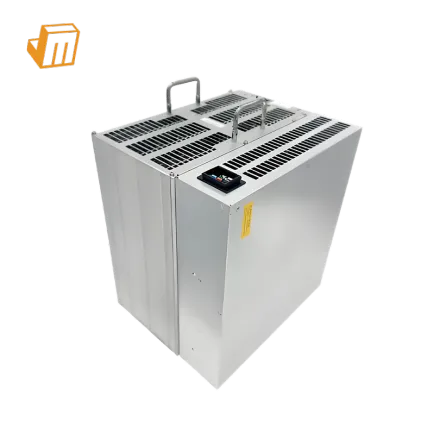

Operating the Bitmain Antminer S21 Imm (215.00 Th/s) requires a fundamentally different approach compared to traditional air-cooled miners. Because this unit is designed from the ground up for liquid immersion, deployment planning must address fluid dynamics, dielectric compatibility, and precise electrical tolerances before the hardware is submerged. Neglecting these preparation steps can lead to immediate hash board degradation, localized hotspotting, or catastrophic power supply failure. To secure the long-term efficiency of 16.00 W/Th, operators must execute a meticulous site audit and gather the necessary specialized infrastructure tools.
Deployment Prerequisite Checklist
Before introducing your hardware to the liquid environment, ensure that every element of your facility is prepared to handle the unique demands of liquid-cooled hashing
- Dielectric Fluid Specification: Ensure you source single-phase synthetic dielectric fluid with a viscosity profile optimized for Bitmain immersion hardware. The fluid must have high material compatibility, ensuring it does not degrade the internal seals, cables, or capacitors of the S21 Imm over years of continuous contact.
- Power Delivery and PDU Matching: The Antminer S21 Imm draws exactly 3440 W under nominal operating conditions. Your power delivery infrastructure must support this load continuously, utilizing high-quality power distribution units (PDUs) that handle 220V to 240V inputs with a minimum 20 percent safety margin to prevent breaker trips.
- Primary and Secondary Cooling Loops: A dry cooler or heat exchanger system capable of dissipating at least 3440 W of thermal energy per miner must be operational. Verify that the flow rate of the secondary water loop matches the requirements of your immersion tank to maintain fluid temperatures below the maximum threshold of 45 degrees Celsius.
- Pre-submersion Inspection Tools: Prepare an insulation resistance tester (megohmmeter) to verify that no electrical leakage paths exist on the chassis before fluid filling, alongside standard diagnostic tools including an Ethernet cable, a network switch, and a dedicated technician laptop.
Configuration & Networking
Once the Antminer S21 Imm is securely positioned within the dielectric fluid bath and the flow pumps are verified, the physical network connections can be completed. Ensure the ethernet port is dry and protected from fluid splashback before inserting a high-grade shielded Cat6 cable. Power up the immersion system pumps first, allowing the dielectric fluid to circulate fully and purge any air pockets trapped between the hash boards before delivering power to the integrated 3440 W power supply.
To establish connection and configure your mining settings, follow these steps 1. Identify the IP address of the miner by utilizing an IP scanning tool such as BTC Tools on a computer connected to the same local area network subnet. 2. Open a secure web browser window, enter the identified IP address into the address bar, and log in to the administrative interface using the default root credentials. 3. Navigate directly to the Miner Configuration tab to enter your primary, secondary, and tertiary Stratum pool addresses along with your worker names and passwords, ensuring that the mining pool supports the SHA-256 algorithm.
Pro Tip: When operating the S21 Imm in a multi-miner tank, always group your IP addresses logically within your DHCP server. This allows you to monitor individual thermal profiles relative to their physical position in the fluid flow path, making it much easier to isolate localized cooling system blockages before they trigger automatic thermal throttling.
Diagnostic Flowchart
Fault 1: Thermal Over-Temperature Protection (Code 230)
This error occurs when the internal temperature sensors on the SHA-256 hash boards exceed safe operational limits, causing the controller to shut down hashing to prevent permanent damage. To resolve this, immediately verify the primary fluid flow rate and ensure the dielectric fluid pumps are operating at the correct RPM. Check the heat exchanger or dry cooler for any debris restricting external airflow or water flow, and use a flow meter to confirm that the fluid velocity across the S21 Imm chassis meets the manufacturer specification. If the fluid flow is adequate, inspect the tank for localized thermal stratification, which can cause pockets of stagnant, hot fluid to pool around specific hash boards.
Fault 2: Hash Board Detection Failure (Missing Chain)
When the miner dashboard displays fewer than the standard number of hash boards, it indicates a communication breakdown between the control board and the individual hashing units. First, check all ribbon cable connections to ensure they are seated firmly and have not been dislodged during immersion bath installation. If the cables are secure, perform a power cycle on the 3440 W power supply to reset the internal logic gates. If the issue persists, measure the voltage output from the power supply to the affected hash board; a drop below the required threshold suggests a localized power delivery failure or a short circuit caused by particulate contamination in the dielectric fluid.
Fault 3: High Chip Error Rate and Hashrate Degradation
If the miner is operational but failing to reach its target hashrate of 215.00 Th/s, look closely at the chip status map for high error rates or non-responsive chips. This degradation is frequently caused by fluid contamination, such as moisture absorption within the dielectric fluid or the accumulation of plasticizers leached from non-compatible hoses. To remedy this, extract a fluid sample to test for dielectric breakdown and moisture content. If contamination is confirmed, you must filter the fluid through an active purification system or perform a complete fluid swap, followed by cleaning the hash boards with pure isopropyl alcohol before re-submerging them.
Technical Support
Maintaining the sophisticated cooling and power balance of an immersion-cooled mining operation requires continuous vigilance. If you encounter persistent hardware faults, fluid degradation issues, or setup challenges that cannot be resolved through standard diagnostics, the technical team is ready to assist. You can contact the JingleMining support team to access expert guidance, replacement parts, and customized deployment advice tailored to your specific infrastructure needs.
Frequently Asked Questions (FAQ)
What type of dielectric fluid is recommended for the Antminer S21 Imm?
Single-phase synthetic fluids with low viscosity and high material compatibility are recommended for this miner. These fluids ensure optimal heat transfer and prevent the degradation of internal seals and cabling. Always consult the official guidelines or contact JingleMining to verify fluid compatibility before filling your tank.
Can I run the S21 Imm with standard air cooling if my immersion tank fails?
No, the S21 Imm is engineered exclusively for liquid immersion and does not feature the heavy aluminum heatsinks or high-RPM fans required for air cooling. Attempting to run this model in open air will cause immediate thermal runaway and automatic shutdown.
How does immersion cooling preserve the 16.00 W/Th efficiency of the S21 Imm?
Immersion cooling eliminates the parasitic power draw of noisy cooling fans, saving significant energy at the unit level. Additionally, the uniform thermal environment keeps the SHA-256 chips running at lower, highly stable temperatures, which minimizes electrical leakage and maximizes hashrate consistency.