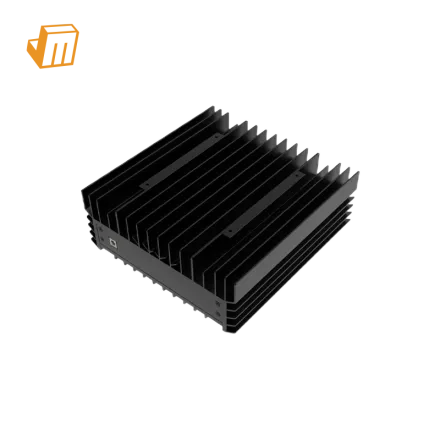

Deploying the IceRiver ALEO AE0 for zkSNARK mining requires careful physical and electrical preparation, especially when operating under the distinct grid and climate conditions found in regions like Brazil. This compact unit delivers a hashrate of 60.00 Mh/s while maintaining a low power draw of 100 W, making it highly suitable for residential and small-scale operations. However, ensuring a stable infrastructure is key to maximizing its efficiency of 1.66 W/Mh. Proper environmental controls, stable network routing, and clean power delivery are essential to maintain consistent performance and protect your hardware investment over the long term.
Deployment Prerequisite Checklist
Before unboxing and powering up your miner, ensure that your deployment site meets all physical, electrical, and environmental requirements to avoid immediate operational faults
- Electrical Infrastructure and Voltage Stability: The IceRiver ALEO AE0 operates at a highly efficient 100 W power draw. In Brazil, residential voltage standards vary significantly between regions, typically ranging from 127V to 220V. Ensure your outlet matches the power adapter specifications. Utilizing a high-quality voltage stabilizer or a dedicated UPS (Uninterruptible Power Supply) is highly recommended to safeguard the sensitive zkSNARK hashing components against local grid fluctuations and transient surges.
- Heat Dissipation and Airflow Management: Operating in warm climates requires active thermal management. Even though the unit only draws 100 W, maintaining an ambient temperature below 35°C is crucial for continuous 60.00 Mh/s output. Position the miner in a well-ventilated space with at least 15 cm of clear space around the intake and exhaust fans to prevent localized thermal throttling.
- Network Connection Infrastructure: While the AE0 is a compact unit, zkSNARK mining requires low-latency, uninterrupted communication with the mining pool. Prepare a high-quality Cat5e or Cat6 Ethernet cable connected directly to your network switch or router. Avoid using unstable Wi-Fi extenders or powerline adapters, as packet loss can severely impact your accepted share rate on the ALEO network.
- Hardware Verification and Inspection: Before powering on the miner, visually inspect the chassis for any loose components or transport damage. Ensure the fan blades spin freely without obstruction. Keep your unique ALEO wallet address and pool stratum details ready for the initial setup phase.
Configuration & Networking
Powering on the IceRiver ALEO AE0 initiates its boot sequence. Connect the power adapter to the miner first, then plug it into your prepared electrical outlet. The indicator lights on the Ethernet port and the control board will begin flashing, signaling that the system is initializing and attempting to acquire an IP address via DHCP. This initialization process typically takes up to two minutes.
Once the miner has successfully booted, you must locate its local IP address to access the web configuration interface. Follow these exact steps to establish a connection 1. Download and run a standard IP scanning tool on a computer connected to the exact same local network subnet as the miner, or use the official IP detection tool provided by the manufacturer. 2. Scan the local IP range (typically 192.168.1.1 to 192.168.1.254) to locate the device host name associated with the IceRiver control board. 3. Copy the identified IP address into a web browser address bar to launch the administrative dashboard. Enter the default credentials (usually 'admin' for both username and password) to access the system settings.
Inside the dashboard, navigate to the Miner Configuration tab to input your mining pool parameters. Input the Stratum URL, port number, and your ALEO wallet address followed by a worker name (for example, wallet_address.worker01). Click save and apply to commit the settings. The IceRiver ALEO AE0 will automatically restart its mining process using the new configuration, gradually ramping up to its target hashrate of 60.00 Mh/s.
Pro Tip: When mining ALEO on the zkSNARK algorithm, verify that your selected mining pool supports the specific mining protocol used by the AE0. If you notice zero hashrate on the pool dashboard despite a green status on the miner web interface, check the pool's stratum protocol settings as some pools require a specific prefix or port for dedicated hardware miners.
Diagnostic Flowchart
If your miner experiences issues, use these diagnostic steps to identify and resolve the most common operational faults
Fault 1: Hashrate Dropping Below 60.00 Mh/s or Showing 60.00 Mh/s
If the miner fails to reach its rated hashrate of 60.00 Mh/s or shows zero output, first inspect the web dashboard for hardware errors or high chip temperatures. Thermal throttling is the most common cause of hashrate drops, especially during hot afternoons. Ensure the ambient temperature is within limits and check that the cooling fan is operating at the correct RPM. If temperatures are normal, verify that the power supply adapter is delivering a stable 100 W output without voltage sags. A faulty power adapter can cause the hashing chips to lose power and drop offline without warning.
Fault 2: Red Status LED and Network Disconnection
A solid red LED on the miner indicates a system error or a failure to connect to the mining pool. Begin troubleshooting by checking the physical Ethernet connection and ensuring your router is successfully assigning an IP address. Log into the web GUI to verify that the Stratum server addresses are spelled correctly and that the port numbers are open. If the network is functional, try pinging the mining pool server from the diagnostic tab in the miner's dashboard to rule out localized ISP routing issues or DNS resolution failures, which are common with some residential broadband providers. Verify current technical details against the official IceRiver product documentation.
Fault 3: Unstable Power Cycles and Reboot Loops
If the IceRiver ALEO AE0 is stuck in a continuous reboot loop, the issue is almost always related to power quality or firmware corruption. Ensure that the input voltage to the power adapter is stable and matches the required specifications. Unplug the miner and check all cable connections. If the power supply is verified as stable, a factory reset may be necessary. Use a physical pin to press and hold the reset button on the miner's panel for ten seconds while the unit is powered on. This will restore the device to its default factory firmware, allowing you to reconfigure the network and pool settings from scratch.
Technical Support
Deploying and maintaining specialized mining hardware can occasionally present unexpected challenges. If you encounter persistent technical issues, network incompatibilities, or hardware anomalies that cannot be resolved through standard troubleshooting steps, the expert support team at JingleMining is ready to assist. For personalized assistance, firmware updates, or hardware diagnostics, please visit the JingleMining website or contact the dedicated support representatives to ensure your IceRiver ALEO AE0 continues to run at peak efficiency.
Frequently Asked Questions (FAQ)
What is the exact power consumption of the IceRiver ALEO AE0 miner?
The IceRiver ALEO AE0 operates with a highly efficient power draw of 100 W. This low power consumption makes it ideal for home operations, especially in regions with high electricity costs.
How can I optimize the cooling of my miner in warm climates?
To maintain peak efficiency, keep the miner in an air-conditioned room or a space with active cross-ventilation. Ensure there are no obstructions near the intake and exhaust fans to allow maximum airflow across the cooling components.
Which algorithm and coin does the IceRiver ALEO AE0 mine?
The IceRiver ALEO AE0 is specifically engineered to mine the ALEO cryptocurrency using the zkSNARK algorithm. It delivers a dedicated hashrate of 60.00 Mh/s with an efficiency rating of 1.66 W/Mh.